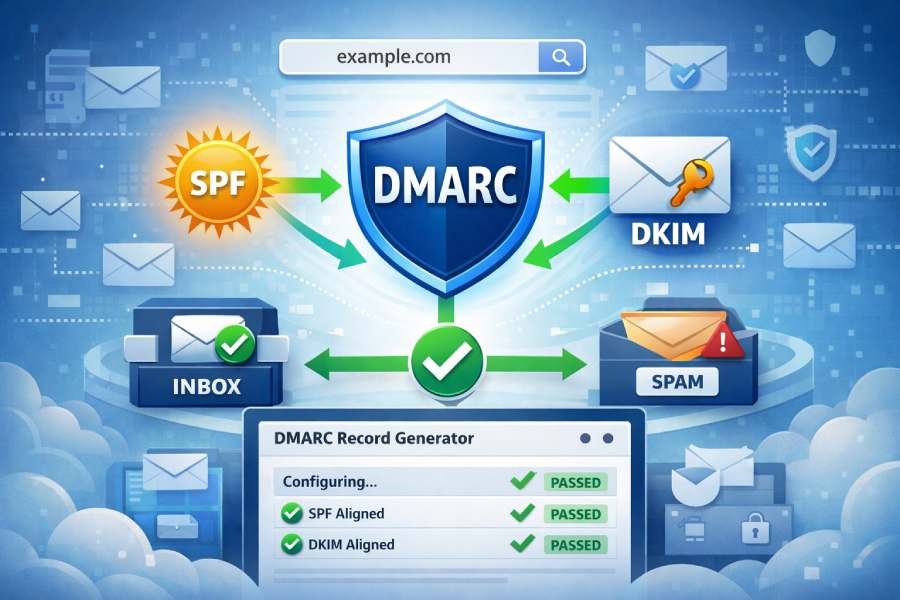
A DMARC record generator streamlines the process of email authentication by aligning your SPF and DKIM records correctly. This alignment is crucial for stopping spoofing and enhancing the chances of email delivery. Rather than having to create intricate DNS records by hand, this tool efficiently produces precise DMARC policies. This empowers businesses to safeguard their domains, track authentication outcomes, and ensure that their emails are deemed credible by recipient servers.
Why DMARC Matters: Stopping Spoofing and Making Email Deliver
DMARC is the control plane that connects Email authentication to policy and reporting. By defining a DMARC policy and placing DMARC DNS records at your Domain, you instruct every Email receiver how to treat messages that fail alignment and how to report back. That combination stops spoofing, hardens Email security, and improves Email deliverability because authenticated mail earns trust with providers like Google and Yahoo.
- Stopping abuse: A properly configured DMARC record reduces Email abuse by enforcing alignment with Sender Policy Framework and DomainKeys Identified Mail. When DMARC alignment fails, your Quarantine policy or Reject policy can prevent brand impersonation.
- Making mail deliver: Aligned messages pass DMARC checks consistently, so Email deliverability and overall Email health improve. Even a None policy with robust DMARC inspection and Monitoring gives you the Diagnostics to tune your Email configuration without disrupting Mail streams.
- Visibility: DMARC Aggregate Reports (a.k.a. Aggregate DMARC reports) provide Statistics across all Email senders using your Domain. Forensic Reports and Failure Reports add detail about individual incidents, letting you perform precise Email source identification.
You’ll typically Publish DMARC record entries alongside SPF and DKIM at the apex and, when needed, at each Subdomain. Run a DMARC check or use a DMARC Inspector/DMARC Domain Checker to verify the syntax and alignment outcomes before moving to an enforcement DMARC policy.
SPF, DKIM, and Alignment 101: How Authentication Works and What “Alignment” Means
SPF basics: Sender Policy Framework
SPF lets you declare which hosts can send on behalf of your Domain via an SPF record. Receivers evaluate the sending IP using DNS Lookup and MX Lookup data, compare it to your SPF policy, and score the result. Use an SPF Record Generator to keep mechanisms tight and avoid errors, and remember that overly long records can break. Good SPF helps DMARC inspection, but DMARC alignment requires the visible From: domain to align with SPF’s domain.
DKIM basics: DomainKeys Identified Mail
DKIM signs messages with a private key; Email receivers validate the signature using a public key in DNS. If the signature validates and the d= domain aligns with the From: domain, DKIM supports your DMARC policy. Use a DKIM Inspector or DKIM Validator to test selectors and keys. Many platforms (e.g., dmarcian, MXToolbox) include DKIM tooling within broader DMARC deployment workflows.
Alignment explained: relaxed vs strict
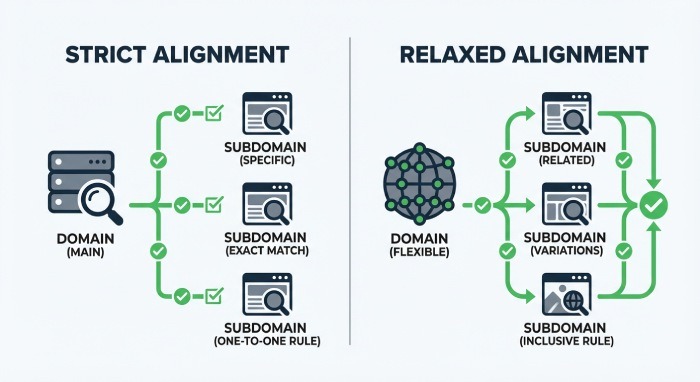
DMARC alignment compares the From: header domain to the domains authenticated by SPF and DKIM. You control strictness via the adkim (for DKIM) and aspf (for SPF) tags in the DMARC record:
- Relaxed: Organizational domains may differ by Subdomain and still align.
- Strict: Exact-domain match is required.
Proper DMARC alignment is what ties Email authentication to your DMARC policy decisions. Before you Publish DMARC record updates, test alignment paths with a DMARC check in tools like the MXToolbox SuperTool.
Inside a DMARC Record: Tags (v, p, rua, ruf, fo, adkim, aspf, pct, sp) and What They Control
- Core tags and policy selection
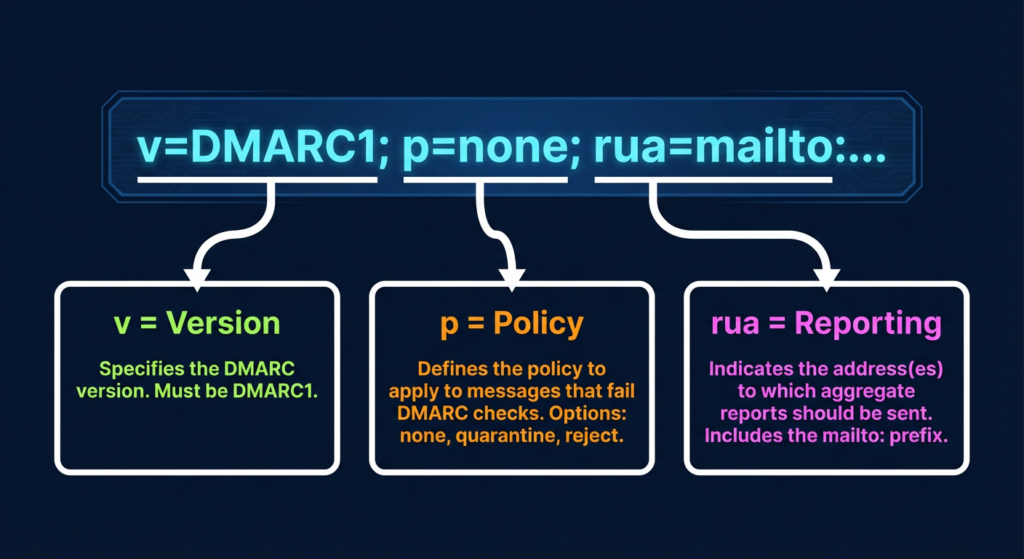
- v: version (always DMARC1).
- p: DMARC policy—choose None policy (monitor only), Quarantine policy, or Reject policy. Policy selection typically starts with none, then progresses to quarantine and reject as confidence grows.
- sp: Subdomain policy—applies a different posture to each Subdomain than the parent Domain.
- pct: Sampling—applies policy to a percentage of failing messages during gradual DMARC deployment.
As you create DMARC record content, make sure these elements match your risk tolerance and rollout plan. Many teams begin with p=none to aggregate DMARC reports, run ongoing DMARC inspection, and only later enforce a stricter stance.
- Reporting controls: rua, ruf, fo
- rua: Report email address (mailto URIs) for DMARC Aggregate Reports. Multiple addresses can be listed for different DMARC Data Providers or your analytics platform.
- ruf: Report destination for Forensic Reports/Failure Reports (per-message samples). These are sensitive; use them sparingly and route to trusted analysis tools.
- fo: Failure reporting options—determine when Forensic Reports are generated (e.g., on DKIM failure, SPF failure, or both).
DMARC Aggregate Reports and Aggregate DMARC reports are XML-based reports that summarize outcomes by source over a period (usually daily). By contrast, Forensic Reports and Failure Reports can arrive near real time and may include redacted headers. Many teams rely on an XML-to-Human converter and automated Data processing pipelines to turn XML-based reports into readable dashboards and actionable Statistics about Mail streams.
- XML-based reports
Aggregate DMARC reports arrive from Email receivers and DMARC Data Providers as compressed XML. Use a Delivery Center or analytics suite to normalize and correlate them.
- Report destination
Choose a Report email address or hosted mailbox capable of handling large volumes and forwarding to your DMARC Management Platform for Monitoring and Diagnostics.
- Record parameters
When you Create DMARC record values, validate Record parameters with a DMARC check and DMARC Inspector to ensure URIs, tags, and delimiters are correct before you Publish DMARC record updates.
3. Alignment and scope tags: adkim, aspf, sp, pct
- adkim and aspf set strict or relaxed alignment. Tighter alignment reduces spoofing risk and boosts Email deliverability once legitimate sources are aligned.
- sp sets how each Subdomain inherits or overrides the parent Domain’s DMARC policy.
- pct is a throttle—use it to phase in enforcement across Mail streams.
- Subdomain policy and sampling
If third-party platforms send from a marketing Subdomain, you might set sp=quarantine while keeping p=reject at the organizational Domain. Combine this with pct sampling to collect Aggregate DMARC reports and conduct DMARC inspection before full enforcement.
Using a DMARC Record Generator: Benefits, Safeguards, and Prerequisites
DMARC Record Generator Explained: Improve SPF and DKIM Alignment
A DMARC record generator streamlines the steps to Create DMARC record content, validates syntax, and guides DMARC alignment choices. It helps you translate business policy into precise DMARC DNS records, then safely Publish DMARC record entries at the Domain and Subdomain levels. Many generators also run an immediate DMARC check, simulate alignment paths, and surface misconfigurations.
Well-known ecosystems include:
- MXToolbox and its SuperTool for DMARC inspection, MX Lookup, DNS Lookup, and Blacklists checks as part of broader Email health Diagnostics.
- dmarcian tools such as the DMARC Record Wizard, Domain Overview, Detail Viewer, Source Viewer, and Delivery Center that support policy design, aggregation of Aggregate DMARC reports, and triage of Forensic Reports/Failure Reports.
- Platforms that integrate a DMARC Inspector, DMARC Domain Checker, Alert Central, and even Deployment services with Dedicated support.
Tools like DMARCreport.com offer a guided DMARC record generator that helps you Create DMARC record values correctly and Publish DMARC record updates with confidence.
Benefits and safeguards you gain
- Faster outcomes: Quick setup and Automated setup paths let you Create DMARC record values aligned with your existing SPF and DKIM within minutes, while Advanced setup supports complex Mail streams.
- Safer rollouts: Built-in DMARC inspection and a pre-flight DMARC check reduce syntax errors and help confirm DMARC policy logic before you Publish DMARC record changes.
- Better reporting: Easy configuration of rua/ruf ensures DMARC Aggregate Reports/Aggregate DMARC reports reach the right Report destination, and that Forensic Reports and Failure Reports are handled securely.
- Integrated tooling: Many suites surface Email abuse signals, check Blacklists, and perform DNS Lookup/MX Lookup to aid Email source identification and ongoing Monitoring.
Prerequisites before generating a record
- DNS access: You must be able to Publish DMARC record TXT entries at _dmarc.yourdomain.tld and, if needed, for each Subdomain. Confirm change windows and propagation times.
- Valid SPF/DKIM: Ensure your SPF record is accurate and that DKIM is signing from all authorized platforms. Validate with an SPF Record Generator, DKIM Inspector, and DKIM Validator. Without both, DMARC alignment will be spotty and Email deliverability may suffer.
- Organizational vs Subdomain scope: Decide how the DMARC policy applies to the organizational Domain and each Subdomain. Use sp and pct to phase enforcement and study Aggregate DMARC reports via your DMARC Management Platform.
- Reporting readiness: Provision the Report email address for rua and ruf, plan an XML-to-Human converter pipeline, and set up Data processing to transform XML-based reports into usable Statistics and Diagnostics.
- Change control: Determine Policy selection (None policy, Quarantine policy, Reject policy). Start at none to gather DMARC Aggregate Reports and run DMARC inspection, then move toward quarantine/reject once all Email sender sources pass a DMARC check.
When to use a generator vs manual editing
- Quick setup or Automated setup: Choose a DMARC record generator when you need to Create DMARC record entries fast, validate Record parameters, and Publish DMARC record updates with low risk.
- Advanced setup or Manual edit: If you operate many Mail streams, multiple Subdomain policies, or complex reporting routes, a generator with Advanced setup options is still ideal, but seasoned admins may perform a Manual edit followed by a DMARC check and external DMARC inspection.
- Program-scale operations: Enterprises benefit from a DMARC Management Platform that unifies DMARC deployment, aggregates Aggregate DMARC reports, correlates Forensic Reports and Failure Reports, and offers Delivery Center dashboards—often complemented by Deployment services and Dedicated support.
By centering your workflow around a DMARC record generator, you reduce configuration drift, accelerate DMARC deployment, and ensure that every DMARC DNS record you Publish supports airtight DMARC alignment, protects your Domain and Subdomain assets, and steadily improves Email deliverability.
Step-by-Step: Using a DMARC Record Generator to Build a Compliant TXT Record
Prerequisites and record parameters
Before you Create DMARC record entries, confirm that your Email configuration has solid SPF and DKIM. A correct SPF record aligned to your Envelope From (Return-Path) and a signed DKIM header with a stable selector are foundational to Email authentication and Email security. Gather key record parameters you will need for a compliant DMARC DNS record:
- v: version (always DMARC1)
- p: DMARC policy (None policy, Quarantine policy, or Reject policy)
- sp: Subdomain policy (optional, inherits from p if omitted)
- rua: Aggregate report destination (mailto URI for DMARC Aggregate Reports)
- ruf: Forensic/Failure report destination (mailto URI for Forensic Reports/Failure Reports)
- adkim and aspf: DMARC alignment modes (relaxed or strict)
- fo: Failure reporting options (e.g., fo=1, fo=d, etc.)
- pct: rollout percentage
- ri: reporting interval for Aggregate DMARC reports (seconds)
Use MX Lookup and DNS Lookup to verify your Domain and Subdomain DNS health, and check for Blacklists that can affect Email deliverability. If you use MXToolbox SuperTool or a DMARC Inspector/DMARC Domain Checker, you can run a DMARC check as part of your Diagnostics.
Generator workflow and publishing
A high-quality DMARC record generator simplifies correct syntax, escaping, and URI formatting. You can use tools such as DMARC Record Wizard from dmarcian, MXToolbox’s SuperTool modules, or platforms that guide you through Record parameters. Tools like DMARCreport.com can help you create DMARC record content that’s compliant and production-ready.
- Quick setup (automated setup)
- Choose p=none to start, set rua to a monitored Report email address, and set adkim/aspf to relax for initial DMARC deployment. This quick setup favors visibility while you stabilize Email deliverability.
- Advanced setup
- Add sp for Subdomain handling, configure for richer Failure Reports, and set ri for Aggregate DMARC reports cadence. Include pct to throttle policy enforcement during pilot phases.
- Manual edit
- If a DMARC record generator outputs a draft, perform a Manual edit to fit internal Policy selection and Report destination rules, especially when multiple Mail streams and Email sender platforms are involved.
Once satisfied, Publish DMARC record TXT at _dmarc.yourdomain.tld. Most DMARC DNS records propagate within hours. Run a DMARC inspection and another DMARC check with DMARC Inspector/DMARC Domain Checker to confirm the Publish DMARC record succeeded and the DMARC DNS records are visible to each Email receiver.
Key Takeaways
- Start with p=none, collect DMARC Aggregate Reports, then phase to Quarantine policy and finally Reject policy as alignment stabilizes.
- Use a reputable DMARC record generator to Create DMARC record content, then Publish DMARC record and validate with a DMARC check and DMARC inspection tools.
- Configure rua/ruf thoughtfully to balance visibility, privacy, and report volume across your Domain and each Subdomain.
- Maintain Email deliverability by auditing all Email sender platforms, rotating DKIM keys, and watching for Blacklists via ongoing Diagnostics.
- Centralize Monitoring and analysis with a DMARC Management Platform to process Aggregate DMARC reports, Forensic Reports, and alert on policy drift.